Posts

Showing posts from April, 2024

Day 4: Demystifying Server Roles and Features in Windows Server 2019
Image
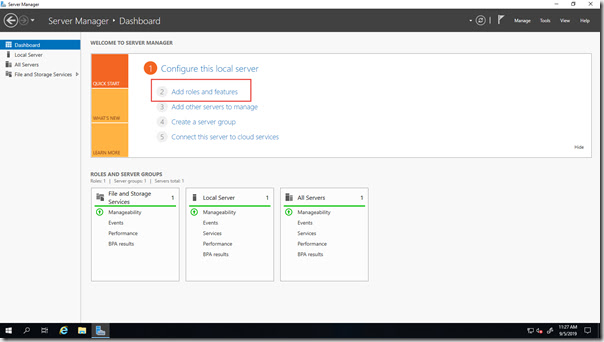
Welcome back, server enthusiasts! Yesterday, we explored the installation process for Windows Server 2019. Today, we'll delve into a crucial concept: Server Roles and Features. Understanding Server Roles and Features is essential for configuring your server to fulfill its designated purpose. Server Roles: These are broad functional areas that define the core services your server will provide. Examples include Active Directory Domain Services (AD DS) for user and group management, or Hyper-V for virtualization. Features: These are more granular components that add specific functionality to a server role or can be installed independently. For instance, the Failover Clustering feature enhances high availability within a cluster. Here are some key points to remember about Server Roles and Features: Modular Design: This allows you to customize your server by installing only the roles and features necessary for your specific tasks. Installation Flexibility: You can add or re...

Day 3: Installing Windows Server 2019: Gearing Up for Success

Image
Greetings, server admins! Today, we'll tackle the first crucial step: installing Windows Server 2019. Having a solid foundation is essential for a smooth and successful server environment. Windows Server 2019 offers multiple installation methods to cater to different deployment scenarios: GUI-based installation (Desktop Experience): This option provides a familiar Windows interface for a user-friendly installation process. Ideal for initial setups or managing single servers. Server Core installation: This minimal footprint option prioritizes functionality over a graphical interface. Well-suited for remote management and resource-constrained environments. Nano Server installation (limited availability): This lightweight option offers the most basic server functionality for highly specialized deployments (Note: Not covered in this series due to limited support). Here's a simplified overview of the installation process (specific steps may vary): Prepare your server: Ens...

Day 2: Unveiling the Benefits of Windows Server 2019

Image
Welcome back, server gurus! Yesterday, we geared up for this exciting month of exploration. Today, let's delve into the reasons why Windows Server 2019 stands out as a reliable and powerful choice for businesses. Top Benefits of Windows Server 2019: Rock-Solid Security: Windows Server 2019 prioritizes security with features like: Windows Defender Advanced Threat Protection (ATP): This proactive solution uses machine learning to detect and prevent advanced cyberattacks. Secure Boot and Device Guard: These features safeguard your server from unauthorized firmware and startup processes. Shielded Virtual Machines: Run highly confidential workloads in isolated environments for maximum protection. Hyper-Converged Infrastructure (HCI) Ready: Simplify your IT infrastructure with Storage Spaces Direct. This software-defined storage solution allows you to leverage existing hardware for scalable and cost-effective storage. Containerization Powerhouse: Embrace the agility a...